TL;DR: A 6W processor in a 116 × 116 mm chassis that can handle office work, soft routing, NAS duty and home theater playback. We break down what the Intel N100 platform actually delivers, where the QN-10 fits, who should buy one, and who should skip it entirely.
Who Is an Intel N100 Mini PC Actually For?
The Intel Processor N100 sits at the sweet spot of Intel’s Alder Lake-N lineup: 4 cores / 4 threads of efficiency cores, a 6W base TDP, and 24 EU of integrated graphics. Raw speed is not the point. What matters is that it sips power, stays cool, and costs almost nothing to leave running 24/7. That combination points to a fairly specific set of users:
- Home and light office work — browsing, Office suites, video calls and 4K streaming are comfortably within reach
- Soft router builders — single-digit idle wattage makes a 7×24 OpenWrt box genuinely practical
- Home NAS builders — pair it with OpenMediaVault or TrueNAS for backups and photo storage, with far more flexibility than an off-the-shelf NAS
- HTPC duty — the iGPU handles 4K@60Hz decode in hardware, silent and frugal next to the TV
- Always-on utility box — download station, Home Assistant hub, or a handful of lightweight Docker containers
One sentence sums it up: this is not a performance machine, it is an always-on machine. Anywhere you need a computer that waits patiently 24 hours a day without fan noise or a spinning power meter, the N100 is in its element.
Intel N100 Performance: Power, Thermals, Size and I/O
Power draw and heat are the headline numbers. Typical idle consumption lands somewhere between 6W and 10W, everyday office use sits around 15W, and even a sustained full load rarely pushes past 25W. Against a conventional desktop that idles near 100W, a year of continuous uptime adds up to real money saved. On thermals, a 6W TDP needs nothing more than a small finned heatsink and a slow-turning fan — the chassis stays warm to the touch, never hot.
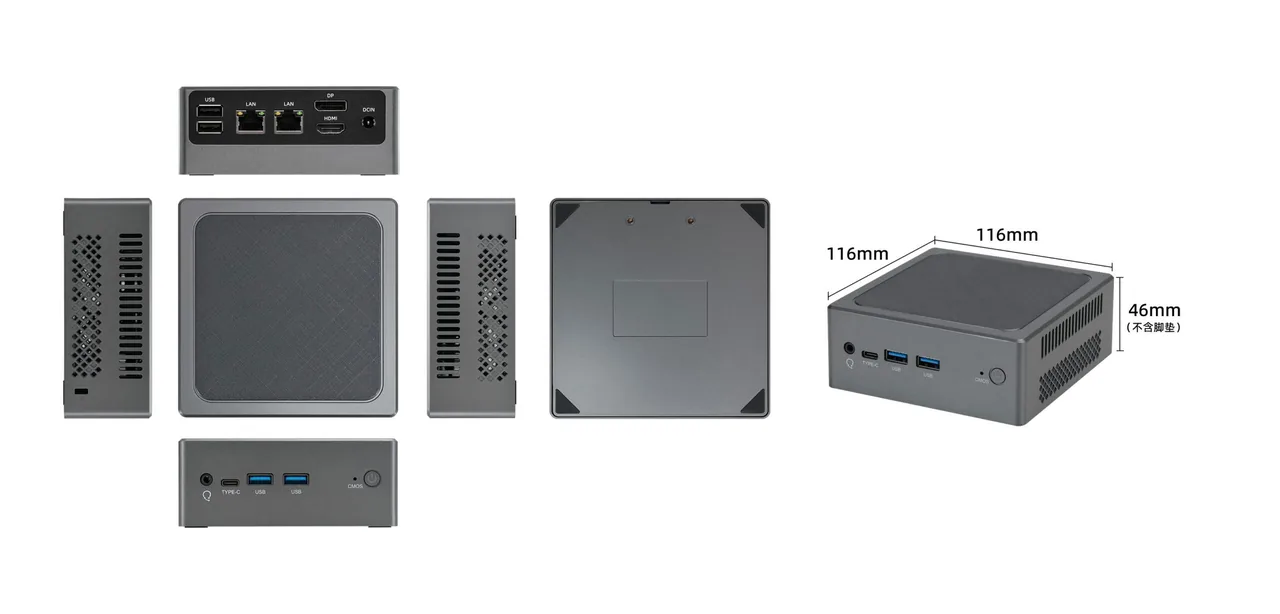
Size and placement are where the form factor earns its keep. Most N100 boxes fall between 0.5L and 1L; the QN-10’s 116 × 116 × 46 mm footprint works out to roughly 0.6L. It tucks behind a TV cabinet, beside a monitor stand, or inside a wiring closet. Screw on a VESA bracket and it disappears entirely behind the display — several models in our mini PC lineup ship with the bracket included.
I/O expansion is the advantage this shape holds over any laptop. You get desktop-class connectivity: dual Ethernet, multiple USB ports, discrete HDMI and DisplayPort video outputs, a 3.5 mm audio jack, plus both an M.2 2280 slot and a 2.5-inch drive bay — so adding a spinning disk for NAS duty is straightforward.
Day-to-day feel, honestly assessed: multi-core performance lands in the neighborhood of a seven- or eight-year-old desktop Core i5. Light productivity and streaming are smooth. Heavy multitasking, video editing and modern gaming are outside its envelope. On memory, the QN-10 N100 mini PC takes a single DDR4-3200 SO-DIMM — buy the 16GB stick up front and leave yourself headroom.
QN-10 Review: A Small Box Built for 24/7 Duty
Build Quality and Design
The QN-10 uses a light-grey ABS shell with rounded edges and a textured, slip-resistant top surface that looks at home on a desk rather than in a server rack. That 0.6L body runs on 12V DC, and the adapter is barely palm-sized — chassis and power brick together weigh less than a magazine.
Port Layout and Connectivity
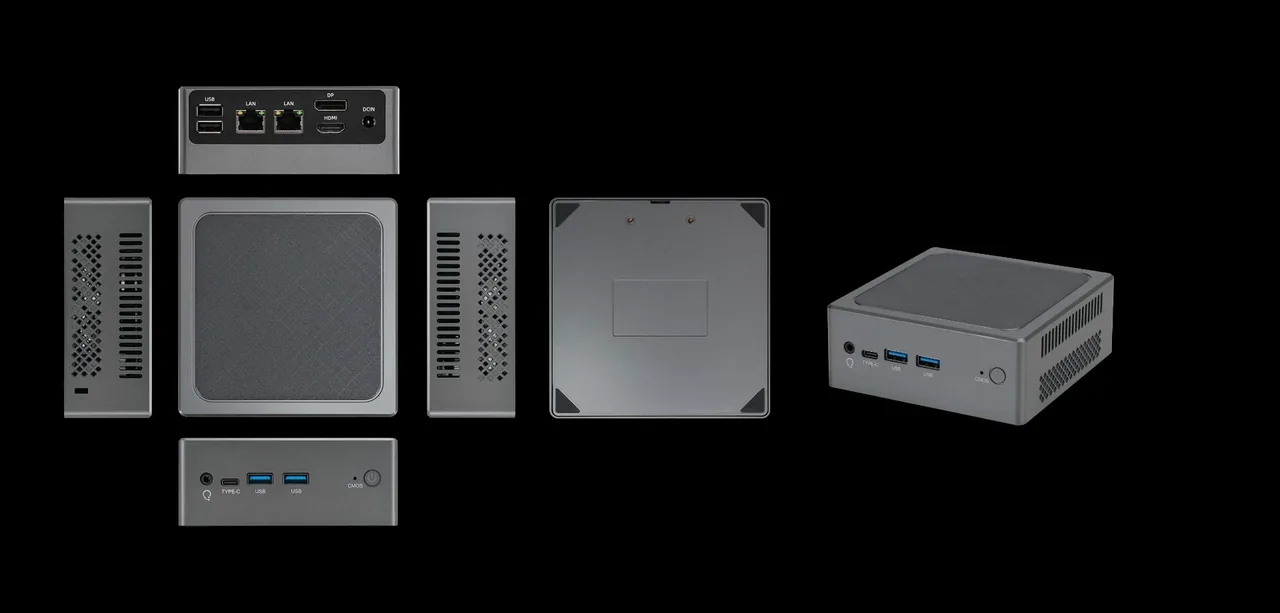
Port selection is generous for the class. Three independent video outputs — HDMI, DisplayPort and USB-C — mean three simultaneous displays. The dual Gigabit LAN ports are exactly what soft router builders need, whether you are running a single-arm router or a bypass (side-car) configuration. Having USB-C and twin USB-A on the front saves you from reaching around the back every time you plug in a flash drive. The one conservative choice: Ethernet stays at Gigabit rather than 2.5GbE. Fine for anything up to a gigabit internet plan, but if you are wiring a 2.5G internal network, a model like the QN-Pro with 2.5GbE LAN is the better fit.
Cooling and Noise
Large perforated grilles on both sides create a straight-through airflow path, with an internally mounted temperature-controlled fan doing the work. Under light load it is effectively inaudible; even at full load the noise stays within reason. The rated operating range is 0°C to 50°C ambient, so it stays stable in less-ventilated spots like a media cabinet or wiring closet. Compared with fully passive designs, it carries one fan — and in exchange delivers steadier sustained performance and a wider temperature tolerance.
Real-World Use Cases
Three roles suit it best: a dual-Gigabit soft router running OpenWrt as your main or bypass router; a home NAS with an M.2 boot drive plus a 2.5-inch drive bay for bulk storage; and an HTPC or always-on living-room box driving a TV and receiver over its triple 4K outputs. Reserved headers for FPC SATA, along with factory support for industrial control and digital signage projects — details on our OEM and ODM capabilities — leave more upgrade room than the price suggests. Variants such as the QN-10 SE differ on video outputs and LAN count, so check the port table of the exact QN-10 configuration before ordering.
Pros, Cons and Who Should Buy One
Pros
- Extremely low power draw — single-digit watts at idle, negligible cost running 24/7
- 0.6L chassis, flexible placement, VESA-mountable behind a monitor
- Complete I/O: triple 4K video out, dual Gigabit LAN, front and rear USB split
- M.2 plus 2.5-inch dual storage bays, NAS-friendly
- Typically priced in the entry-level bracket — strong value overall
Cons
- 4 cores with no hyperthreading; heavy multitasking and creative workloads struggle
- Gigabit Ethernet only — 2.5G networking means stepping up to another model, such as those listed in our product lineup
- Single memory slot caps upgrades at 32GB
- Active fan onboard; those chasing absolute silence should consider a passive design
Buy it if you are building your first soft router or NAS, want a quiet family office machine, or need an always-on smart home and download box.
Skip it if you are a gamer, a video editor, a developer doing heavy compilation, or someone running serious virtualization. Those workloads need a full-power platform instead.
What to check before buying: whether RAM starts at a single 16GB module, whether the SSD slot is a PCIe M.2 2280, and whether the port count and Ethernet spec match your soft router plan.
Final Verdict
The Intel N100 strikes a rare balance between adequate performance, low power draw and low cost, and the QN-10 extracts most of what the platform has to offer with triple video outputs, dual Gigabit LAN and full storage expansion. It is not for everyone. But if what you need is a small, quiet machine that stays on around the clock, it is very likely the least money you can spend for the fewest compromises.
Planning a rollout rather than a single box? Browse the full mini PC lineup or talk to our engineering team about OEM configurations, lead times and volume pricing.
Specifications for the QN-10 are based on official product documentation..
Key topics covered: Intel N100 mini PC · low-power mini PC · N100 mini PC review · soft router mini PC · home NAS mini PC · HTPC mini PC